Posts

Step-by-Step SharePoint 2013 Installation Guide Part-1
Image
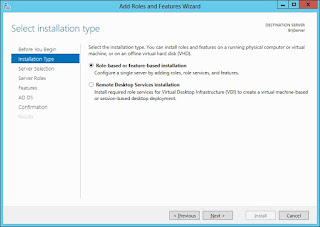
SharePoint 2013 is the new version of SharePoint and can only be installed on Windows Server 2008 R2 with SP1 and Windows Server 2012. Since, I have installed it for testing purpose only so I've used all the evaluation version and express edition of software. You can also use full version of softwares if you have. Below is the list of software needed to complete this post. Software Requirement Windows Server 2012 180 days evaluation. SQL Server Express 2012 SharePoint Server 2013 180 days Trial. Hardware Requirement For installing SharePoint 2013 we need 64-bit system with minimum 8 GB RAM and 80 GB Hard-Disk space. Although you can install it in system with 4GB RAM also, but performance wise it will run slow and probably get hanged when doing some tidious work. After this series of post, you will have a good idea of Installation and con...

CRUD operation on Groups using REST

In the previous post we have seen CRUD operation on SharePoint Users. In this post we are going to discuss about the operations on Groups in SharePoint Library using rest api. Starting with the creation of Groups class in our"RESTApiHelper" namespace. RESTApiHelper.Groups = function (SiteUrl) {     this.SiteUrl = SiteUrl; Get All groups in a Site         this.GetAllGroups = function (doSuccess, doError) {         jQuery.ajax({             url: this.SiteUrl + "/_api/web/sitegroups",             method: "GET",             headers: {                 "accept": "application/json; odata=verbose"             },             success: ...

CRUD operation on Folders using REST

In the previous post we have seen CRUD operation on SharePoint Files. In this post we are going to discuss about the operations on folders in SharePoint Library using rest api. Starting with the creation of Folder class in our"RESTApiHelper" namespace. RESTApiHelper.Folders = function (SiteUrl,ListName) {     this.SiteUrl = SiteUrl;     this.ListName = ListName; Get Folder By Url         this.GetFolderByUrl = function (FolderUrl, doSuccess, doError) {         jQuery.ajax({             url: SiteUrl + "/_api/web/getfolderbyserverrelativeurl('" + FolderUrl + "')",             type: "GET",             headers: {                 "accept": "application/json;odata=verbose"       ...

CRUD operation on Users using REST

In the previous post we have seen CRUD operation on SharePoint Folders. In this post we are going to discuss about the operations on users in SharePoint Library using rest api. Starting with the creation of Users class in our"RESTApiHelper" namespace. RESTApiHelper.Users = function (SiteUrl) {     this.SiteUrl = SiteUrl; Get all users in site     this.GetAllUsers = function (doSuccess, doError) {         jQuery.ajax({             url: this.SiteUrl + "/_api/web/SiteUsers",             method: "GET",             headers: {                 "accept": "application/json; odata=verbose"             },   ...

CRUD operation on Files using REST

In the previous post we have seen CRUD operation on SharePoint ListItems. In this post we are going to discuss about the operations on files in SharePoint Library using rest api. Starting with the creation of File class in our"RESTApiHelper" namespace. RESTApiHelper.Files = function (SiteUrl,ListName,FolderUrl) {     this.SiteUrl = SiteUrl;     this.ListName = ListName;     this.FolderUrl = FolderUrl;     Get All Files in Folder     this.GetAllFiles = function (doSuccess, doError) {         jQuery.ajax({             url: this.SiteUrl + "/_api/web/getfolderbyserverrelativeurl('" + this.FolderUrl + "')/Files",             type: "GET",             headers: {                 ...

CRUD operation on ListItem using REST

In the previous post we have seen CRUD operation on SharePoint List. In this post we are going to discuss about the operations on listitems using rest api. Starting with the creation of Items class in our"RESTApiHelper" namespace. RESTApiHelper.Items = function(SiteUrl,ListName){     this.SiteUrl = SiteUrl;     this.ListName = ListName; Get All List Items in SharePoint List         this.GetAllItems = function (doSuccess, doError) {         jQuery.ajax({             url: this.SiteUrl + "/_api/web/lists/GetByTitle('" + this.ListName + "')/items",             type: "GET",             headers: { "Accept": "application/json; odata=verbose" },             success: doSuccess,         ...

CRUD operation on SharePoint List using REST/Jquery

In the previous post we have discussed about the CRUD operations on Web object using rest/jquery. In this blog post, we'll discuss about the operations performed on sharepoint list object using REST api. Starting with the creation of List property in the "RESTApiHelper" namespace created in previous blog post. RESTApiHelper.List = function (SiteUrl,ListName) {     this.SiteUrl = SiteUrl; this.ListName = ListName; Get List and List Properties We can get the rest response for list using the url syntax involving the list name as "http://demositeurl/_api/web/lists/GetByTitle('DemoList')" or alternatively you can use the guid of the list as "http://demositeurl/_api/web/lists(guid'51925dd7-2108-481a-b1ef-4bfa4e69d48b')" this.GetList = function (doSuccess, doError) {             jQuery.ajax({                 url: SiteUrl + "/_api/web/li...